Part C — Operator
Operator adds manual same-bar information: at-publish Decisions in-app, paper history replay, Fill Ledger, and Open Proposals. Operator does not include decision webhooks or brokerage automation — upgrade to Allocator (Part D) for integration or automation.
C.1 Who Operator is for
Choose Operator when you want to:
- Watch the Oracle in-app on the latest closed bar
- Use paper history replay, Fill Ledger, and Open Proposals
- Trade by hand using same-bar decision context
Operator is not outbound webhooks or native brokerage automation (both are Allocator — Part D).
C.2 Timing (Operator)
| Surface | Operator |
|---|---|
| In-app Markets / Decisions | At publish |
| Decision webhooks | — (Allocator only; see D.2) |
| Brokerage automation | — (Allocator only; see Part D) |
Full matrix: A.2.
C.3 Paper book surfaces (Operator)
Operator includes paper book surfaces beyond Validator:
| Surface | Role |
|---|---|
| Paper history replay | History from when the paper book started, where enabled |
| Fill Ledger | What executed on the institutional paper book |
| Open Proposals | What is still waiting |
These are audit surfaces for the Oracle’s paper track — not your live brokerage. If a screen is marked Coming soon in-app, trust the app.
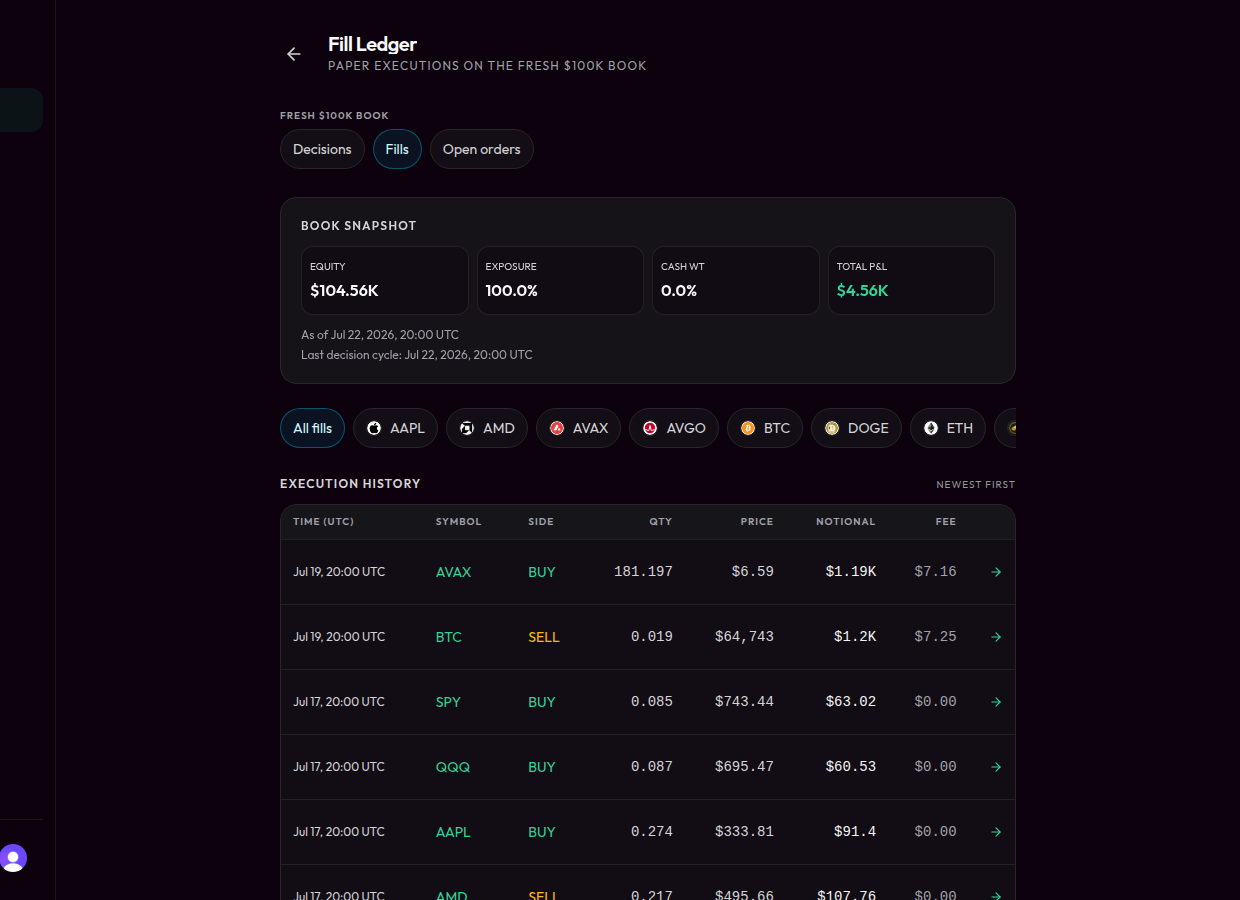
Operator ledger — Fill Ledger / Open orders are audit surfaces, not your live brokerage blotter.
C.4 Upgrade path to Allocator (webhooks / automation)
If you need Slack, Discord, custom URL delivery, or native brokerage automation, upgrade to Allocator (Part D). Founders may offer a private integrator pilot (webhooks without the platform license) to qualified Operators — that is manual onboarding, not self-serve checkout.
C.5 Manual review vs standing authorization (Operator)
On Operator alone, SagaHalla does not place broker orders for you. Native per-trade Manual Review and Standing Instruction modes for brokerage routing are Allocator controls — see D.12.
C.6 Failure modes (Operator path)
| Failure | What to do |
|---|---|
| Stale or unexpected bar in-app | Check freshness indicators; do not force a trade |
| Missing Fill Ledger / Open Proposals | Confirm Operator entitlement in Settings |
| Expected webhooks | Webhooks require Allocator (or integrator pilot provisioning) |