Own the work context
Keep your files, work records and reviewed memory connected in your chosen environment. Decide what context to share with configured models and tools; remote inference sends selected context to that provider.
Saga Agent / Intent into action
Own the work context. Bring your model keys. Decide what the agent may do. Saga Agent is an AI harness that connects context, models, tools and permissions to work you can review—in VS Code or the CLI.
Keep your files, work records and reviewed memory connected in your chosen environment. Decide what context to share with configured models and tools; remote inference sends selected context to that provider.
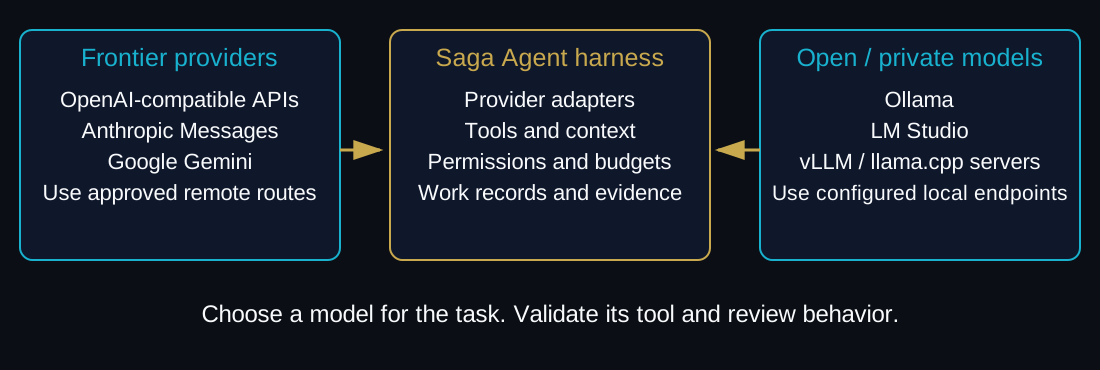
Choose supported frontier or open-model routes for the task, budget and data policy. AI is BYOK: provider charges are yours to manage, with no bundled token allowance implied.
Set scope, handle approvals and inspect changes and checks. A model suggestion becomes action only through the configured runtime controls.
Choose how you want to engage: understand a problem, pursue a defined goal, or organize dependent work. The mode sets the workflow; you keep direction.
Ask questions, investigate files and trace how a system works. Move from conversation to proposed edits when you are ready to review them.
Define the objective and what done means. Let the agent work through the steps, inspect results and run checks within the scope you authorize.
Organize a complex task into execution steps. Review the intended scope and sequence before letting the agent act.
Search, edit, verify and continue substantial tasks through the package supplied by your network.
Search files and inspect code structure before acting. Focus the model on the relevant symbols, references and diagnostics so you can spend less time assembling context.
Use syntax-aware outlines and symbol edits for work across files. Inspect proposed changes, accept or reject them, and use the supported undo path when needed.
Review requests for additional paths or commands before a task expands. Handle pending approvals in the workbench.
Run authorized tests and diagnostics, inspect diffs and examine Git state. Keep failures visible while the agent works through the next correction.
Queue established goals for later work and return to pending tasks or approvals. Reviewed memory notes can preserve useful context across sessions.
Keep work records, changed paths and checks connected. Inspect the resulting evidence capsule to understand what ran and what it established; acceptance remains a separate review.
Illustrative task, not a recorded run: change a shared rule and identify the tests needed to review it.
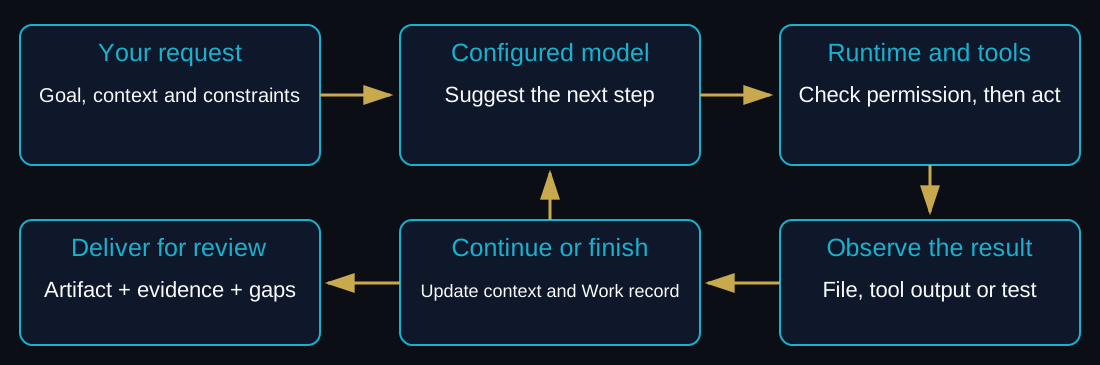
Scope: locate the validator, its callers and dependent tests; limit changes to the agreed files.
Expected work: propose the rule change and test updates, then run the authorized checks and retain their results.
Review material: a diff, test results and any unresolved gaps, ready for a person to assess against the requested change.
Use the VS Code panel or command-line runtime with supported model routes and opt-in tool connections.
VS Code: interact with the agent and inspect edits, tasks and approvals in the panel.
CLI: run authorized tasks and inspect their status and evidence from the terminal.
Usage: follow token and cost records for a run.
MCP: configure trusted tool servers and their permissions before using them.
Optional integration preview: take an authorized task from GAME Plan and return the work record and checks for review. GAME Plan coordinates the wider work; Saga Agent carries out the bounded task.
Available to SagaHalla builders and Aregis members through scoped access; retail offerings and pricing are still being finalized. GitLab access is coming soon and requires the qualifying subscription, signed applicable agreement and verified network/product authorization.
Our home network for builders, early adoption and contributions to the tools. Bring a task or integration you want to explore.
Join SagaHalla with Agent interestThe first external licensed network, for scoped engagements and regulated workflows under its applicable terms.
Join through Aregis